
Change Log
2026/04/02
Pro Subscription Launched
- Launched Pro paid subscription with the latest advanced models
- Paid users can use Auto model without limits
- See Pricing for details
Free Plan Adjustment
- Free plan no longer provides daily free credits, replaced with a one-time credit allocation
- See Pricing documentation for details
2026/03/19
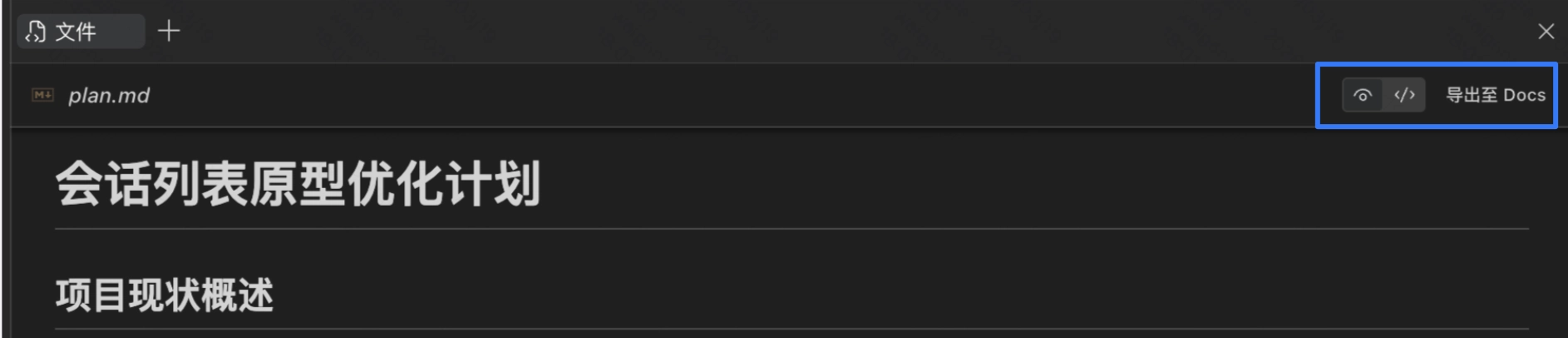
Export Markdown Files
- Support exporting generated markdown files such as plan documents and research results for editing and sharing.
- Duet Space supports switching between preview mode and code mode for the generated markdown files. This capability will also be available in the IDE soon.
2026/03/17
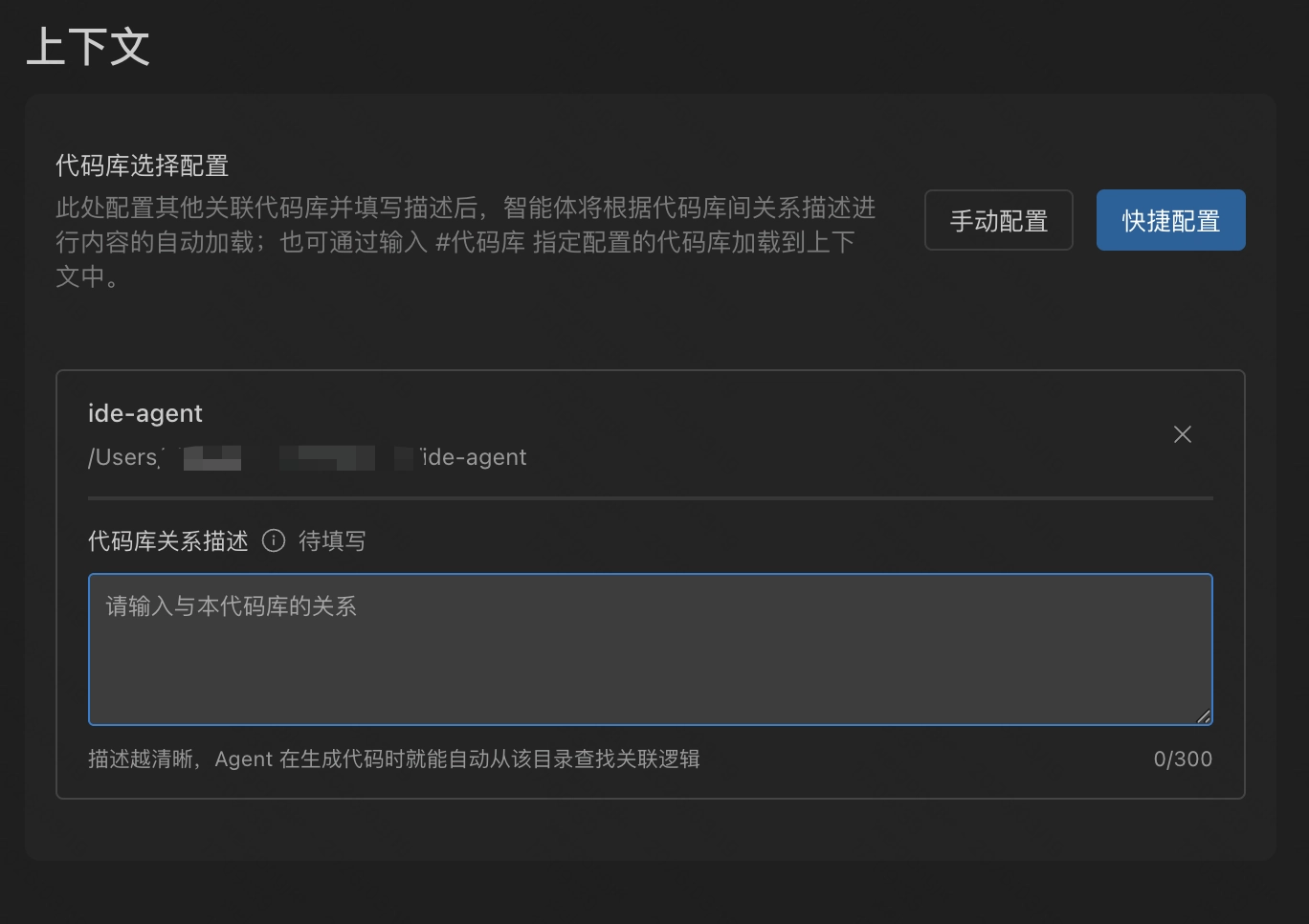
Cross-Repository Search Configuration Optimization
Optimized cross-repository search configuration: After configuring in settings, you no longer need to manually use #codebase reference. Agent can search on demand.
To improve Agent search accuracy, it is recommended to fill in the relationship description between other repositories and the codebase.
Fixes & Optimizations
- Fixed several issues
2026/03/12
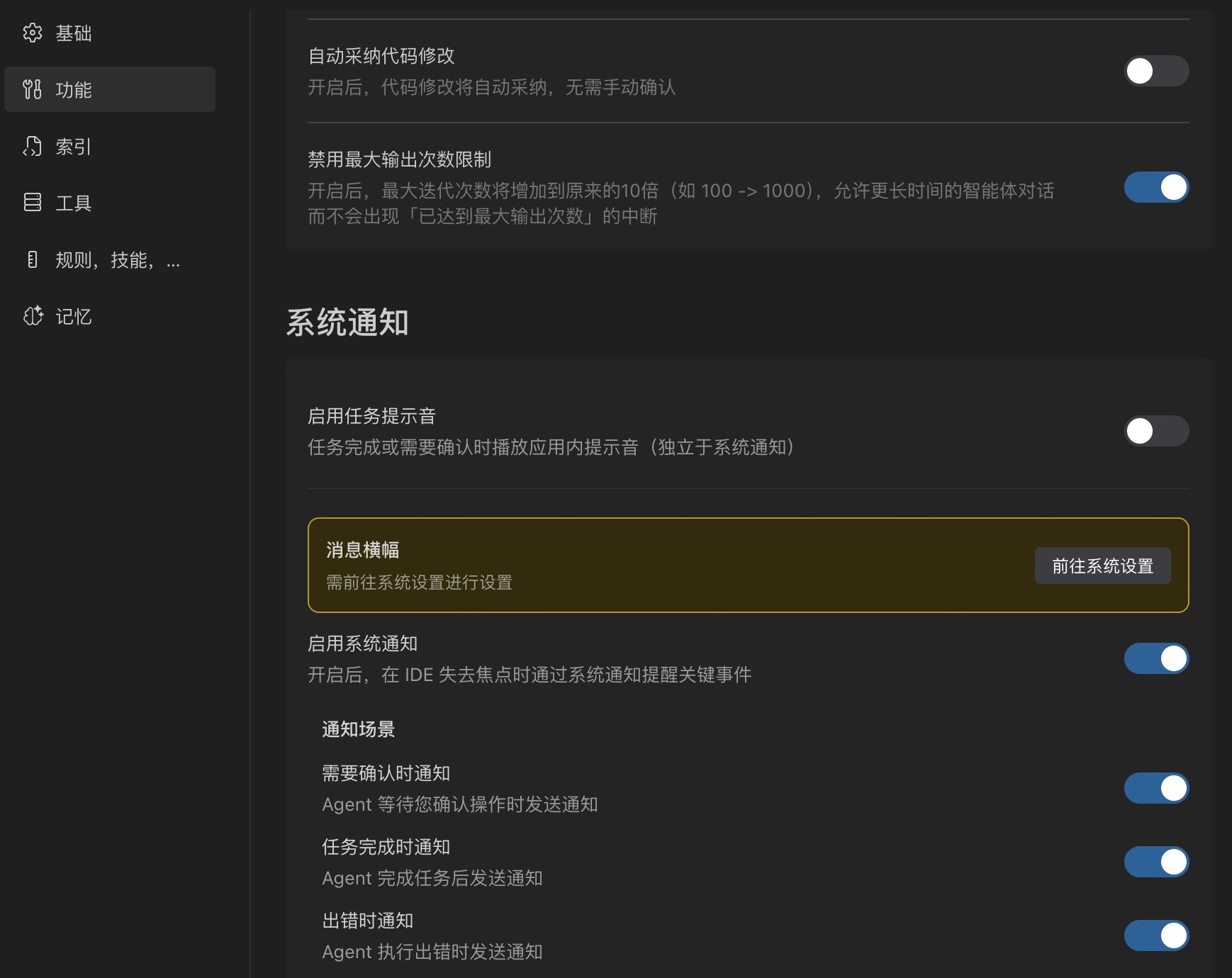
System-Level Desktop Notifications
Added system-level desktop notification capability, supporting proactive push notifications at key nodes such as Agent task completion, pending manual confirmation, and execution exceptions.
Duet Space Session Drag & Drop
Support dragging sessions from the left panel to the input box as context in Duet Space, to perceive the corresponding session trajectory and assets.
2026/03/10
Duet Space Parallel Sessions Upgrade
Duet Space upgraded parallel session capability, supporting up to 20 sessions executing in parallel.
Fixes & Optimizations
- Fixed several issues
2026/03/05
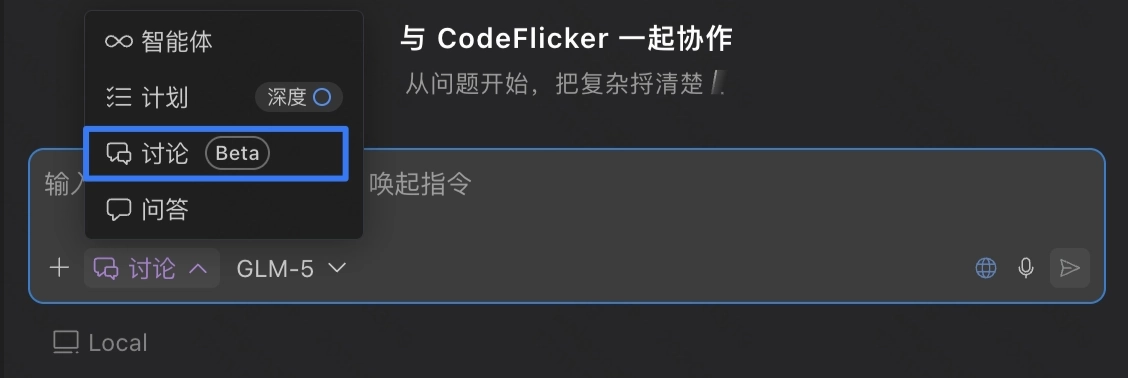
"Discuss" Mode
Launched "Discuss" mode. For complex tasks, you can first discuss with AI in "Discuss" mode before executing the task.
Duet Space Workspace Drag & Drop
Support dragging "Workspace" from the left panel to the input box as context in Duet Space.
Fixes & Optimizations
- Fixed several issues
2026/03/03
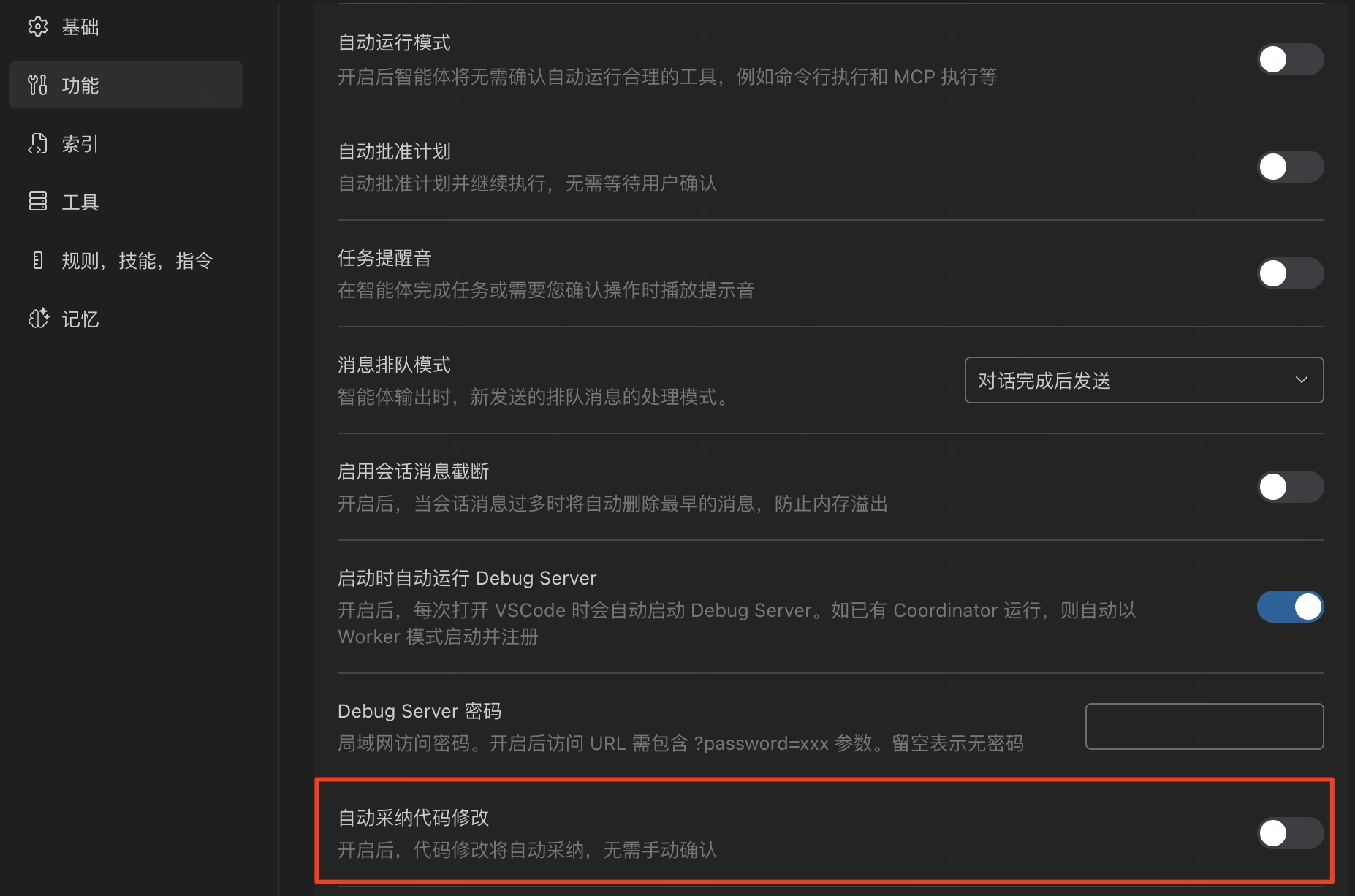
Auto Accept Generated Code
Support configuring auto accept for generated code.
Fixes & Optimizations
- Fixed several bugs
2026/02/27
Fixes & Optimizations
- Fixed several bugs
2026/02/09
New Feature Guide
Added new feature guide to help you discover new features easily!
Fixes & Optimizations
- Fixed several bugs
2026/02/07
Feedback Optimization
Optimized user feedback entry.
2026/02/05
Top Navigation Optimization
Optimized top navigation bar. Welcome to try Duet Space! Learn more: Duet Space
Copy Conversation
Support copying conversation.
Fixes & Optimizations
- Fixed several bugs
2026/02/03
Message Queue Supports Queue Mode
- When sending a new message while the previous message is still generating, it will queue by default and automatically send when the previous message finishes.
- While waiting, you can also choose to send the message immediately.
- Message queue also supports another mode: Send Immediately. You can configure this in Settings > Features.
Fixes & Optimizations
- Support sending messages with only images attached.
- Optimized input interaction, terminal performance, memory and fixed various bugs.
2026/01/29
Version[1.0.1]
Command Support for Slash Command
- Support configuring personal commands or project commands in settings
- Personal commands can be used in all projects, project commands can only be used in the current project
- Enter / in the input box to select from the list
.CA6QYwAt.png)
2026/01/26
Version[0.6.2601260]
Command Support for Skills
Enter / to invoke the Skills list and quickly call the required skills.
.CWgL1V9l.png)
2026/01/23
Version[0.6.2601230]
Duet Space
Introducing the brand new Duet Space independent window, featuring a four-zone design with task zone, conversation zone, results zone, and artifacts zone, supporting multi-repository/multi-task parallel execution. Reinforcing task-centric agent-driven development mode while solving the problems of space competition between plugin panels and editing areas in traditional IDEs and narrow AI conversation panels, forming a "complementary rather than replacement" collaboration relationship with the user's main IDE
.kbw_jYZb.png)
Duet Space detailed usage guide: Duet Space
Cross-Repository Information Retrieval
Configure other local repositories related to the current repository, and in "Deep Plan" mode, the Agent can conduct cross-repository deep research and retrieve information related to tasks. Specific steps:
- Configure associated repositories: Configure other local repositories related to the current repository (support for cross-repository information reading and code generation in all modes will be available soon)
.DpNte2lf.png)
- Enable "Deep Plan" mode
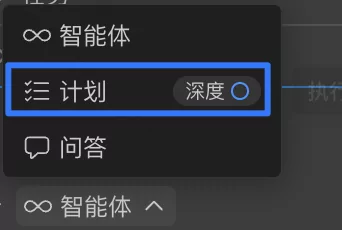
- Select the configured code repository to describe the task
.D0t1BgGU.png)
2026/01/22
Version[0.6.2601220]
Skills Support
Added Skills support, all agent modes can call Skills, supports automatic loading of Skills configured by users in Claude Code, Codex, OpenCode, and allows manual creation of custom Skills.
.DIxIYNdA.png)
For detailed usage guide, see: Skills
Intelligent Mode Recommendation
When your question is relatively complex and involves task planning or multi-step execution, the system will automatically suggest switching to a more advanced mode (such as plan or deep plan mode) to break down and complete tasks more efficiently.
.dCx7KDsi.png)
Fixes & Optimizations (3)
- Intelligent preview startup optimization: Upgraded intelligent preview startup mechanism, implementing project startup through SubAgent, more accurate and faster.
- Fixed several input box issues, improving user experience.
- Enhanced browser tool stability and running speed.
2026/01/20
Version[0.6.2601200]
Memory
- Supports visual viewing and management of memories generated during conversations, allows viewing memory details or deleting some memories as needed.
- Added memory-related switches, freely control whether to automatically add generated memories to context and whether to automatically generate new memories.
.CdCkFHd_.png)
Fixes & Optimizations (3)
- Fixed several worktree-related issues, improving stability in multi-workspace scenarios.
- Fixed abnormal display of some file names during Lint checks.
- Optimized the attribution logic of tool call tokens in context usage statistics, making data display more accurate
2026/01/08
Version[0.6.2601080]
Context
- Supports configuring context strategy for new conversations, can choose whether to automatically carry recent conversation summary information to help AI better understand the overall project context and historical decisions.
.98YRWhVD.png)
- Supports viewing detailed composition of context usage, expand "Details" to understand the token proportion of each part of the context in the conversation.
.O8y02ArN.png)
Memory
Supports autonomous identification of key information during conversations, deposits and creates memories, continuously accumulating project and collaboration preferences,
.CXIBXjn4.png)
Early Access Version
Added Early Access version, experience the latest IDE capabilities first. After enabling, the IDE will automatically download the latest Early Access version, restart the IDE to take effect.
.BRpesxr_.png)
2025/12/25
Version[0.6.2512250]
AGENTS.md Support
Supports automatic reading of AGENTS.md in the project, no additional configuration required, participates in conversations and task execution as part of the model context. Learn more: What is AGENTS.md?
2025/12/16
Version[0.6.2512160]
Voice Input
Free your hands, speak to input, supports collaborating with AI through voice, more efficient input and more natural expression (currently only available for VS Code plugin, IDE coming soon).
.BJXZyvF8.png)
Browser
The browser entry in the input box has been upgraded from "preview only" to "browser usage" capability, and supports conveniently selecting the way to open web pages with browser tools.
.xR6pkI2Y.png)
Figma in IDE
After opening Figma using the local Chrome browser (with Chrome plugin), provides the same "node selection and one-click add to conversation" capability as the IDE's built-in browser, no need to frequently switch between design tools and development tools, more coherent and focused.
.C9wuqnXq.png)
Fixes & Optimizations (13)
- File editing tool:
- Improved file editing tool stability, significantly reduced call failure frequency.
- Fixed abnormal processing logic for blank lines at the beginning of files when adding file modifications, which caused -1 change differences
- Added prompt text when file editing tool is interrupted or encounters exceptions, fixed previous blank display issue.
- Command line tool:
- Fixed issue where command line tool might lose preceding commands when entering commands multiple times, causing abnormal output.
- Optimized command line tool display style.
- Basic experience:
- Optimized mode switching interaction, default mode restored to display "Agent", clearer and more intuitive.
- Optimized #context browser icon.
- Conversation flow:
- Appropriately reduced the number of display lines for generated code blocks and command lines in conversations, improving reading efficiency of conversation flow content.
- Automatically scroll conversation flow to bottom after sending new conversation.
- Fixed issue where previous conversation state still showed "thinking" after starting new conversation.
- Fixed issue where task queue failed to auto-send after command line tool was manually stopped.
- Optimized context compression strategy, solved message sending delay and lag issues in long conversations.
- Fixed VS Code plugin editing prediction jump prompt "Tab to jump here" blocking code or displaying repeatedly.
2025/12/13
Version[0.6.2512130]
Plan Mode
Added plan mode, can autonomously ask clarifying questions before execution, quickly obtain relevant context to generate implementation plan (Plan.md), and execute accordingly. Compared to deep plan mode (original "research mode"), plan mode is more lightweight, achieving better balance between generation quality and generation time.
.lEKhpqmG.png)
Task Queue
Supports pre-scheduling subsequent tasks for the agent, enter and send messages to join the queue.
Visualized Code Changes (Beta)
Upgraded code change review method from traditional "by file/code block" mode to "by functional logic dimension", closer to real CR process. Based on change code analysis, visualizes and more intuitively presents related links and change impact scope, faster understanding of code changes' impact on overall functionality.
Browser
IDE built-in browser now supports executing automated operations. Currently, all three ways of opening web pages with browser tools (IDE built-in, Chromium sandbox, local Chrome) support "browser usage" capability.
Fixes & Optimizations (11)
- Optimized AI panel homepage experience, including AI panel title interaction and input box display position.
- Fixed regular search tool search query flickering issue.
- Optimized file editing tool, supports editing based on unsaved code change content by users or AI in the editor.
- Optimized tool loop call fault tolerance mechanism.
- Fixed issue where code changes in code files were not correctly rolled back after manually rejecting agent-generated changes.
- Fixed issue where new conversations could not be created in non-current workspaces.
- Fixed issue where conversation continued to generate automatically after manually stopping generation.
- Fixed issue where task queue could not send and could not pause during long command execution.
- Optimized context compression strategy, reduced compression time. Automatically enabled silently when token usage reaches 70%, compression context automatically applied when it reaches 90%.
- Optimized Auto Fix function scope, supports Lint issue checking and fixing at directory level.
- Fixed IDE editing prediction jump prompt "Tab to jump here" blocking code or displaying repeatedly.
2025/12/03
Version[0.6.2512020]
Research Mode
Mode Integration
Duet mode integrated into unified mode selector, supports flexible switching between different modes in conversations, can enter or exit any mode at any time, more efficiently adapting to diverse development scenarios. Duet mode renamed to "Research", highlighting exploration capability for vague and broad complex tasks, while as Agentic becomes more popular, default mode no longer displays "Agent" concept.
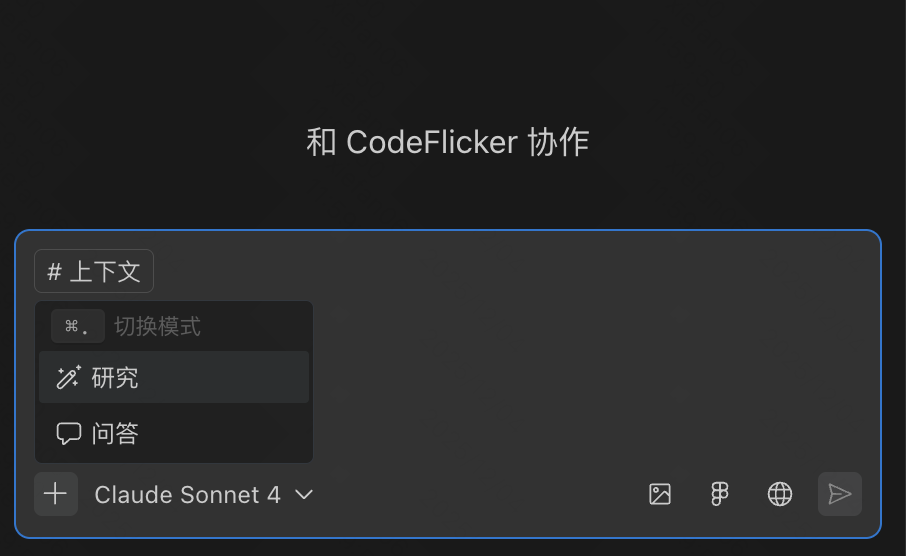
| Mode | Use Cases | Function Description |
|---|---|---|
| Default | Development tasks with clear goals Mode name not perceived | Autonomously explore code repository (autonomous perception, autonomous decision-making), edit multiple files (engineering-level changes), run commands and fix errors, complete development tasks |
| Research | Complex tasks without fully clear goals/paths, requiring early clarification and analysis | Autonomously ask clarifying questions and conduct multi-dimensional cross-research of repository code before execution (can obtain more and deeper context compared to default mode), generate implementation plan as subsequent execution specification basis |
| Q&A | Learning, exploration and information acquisition | Search repository code or external knowledge, answer questions and provide explanations, will not make any actual changes to the project |
Interactive Question Clarification
Question clarification can effectively help AI more accurately understand user intent. Supports structured interactive capability, improving information display efficiency and recommended answer selection/custom input efficiency.
Implementation Plan
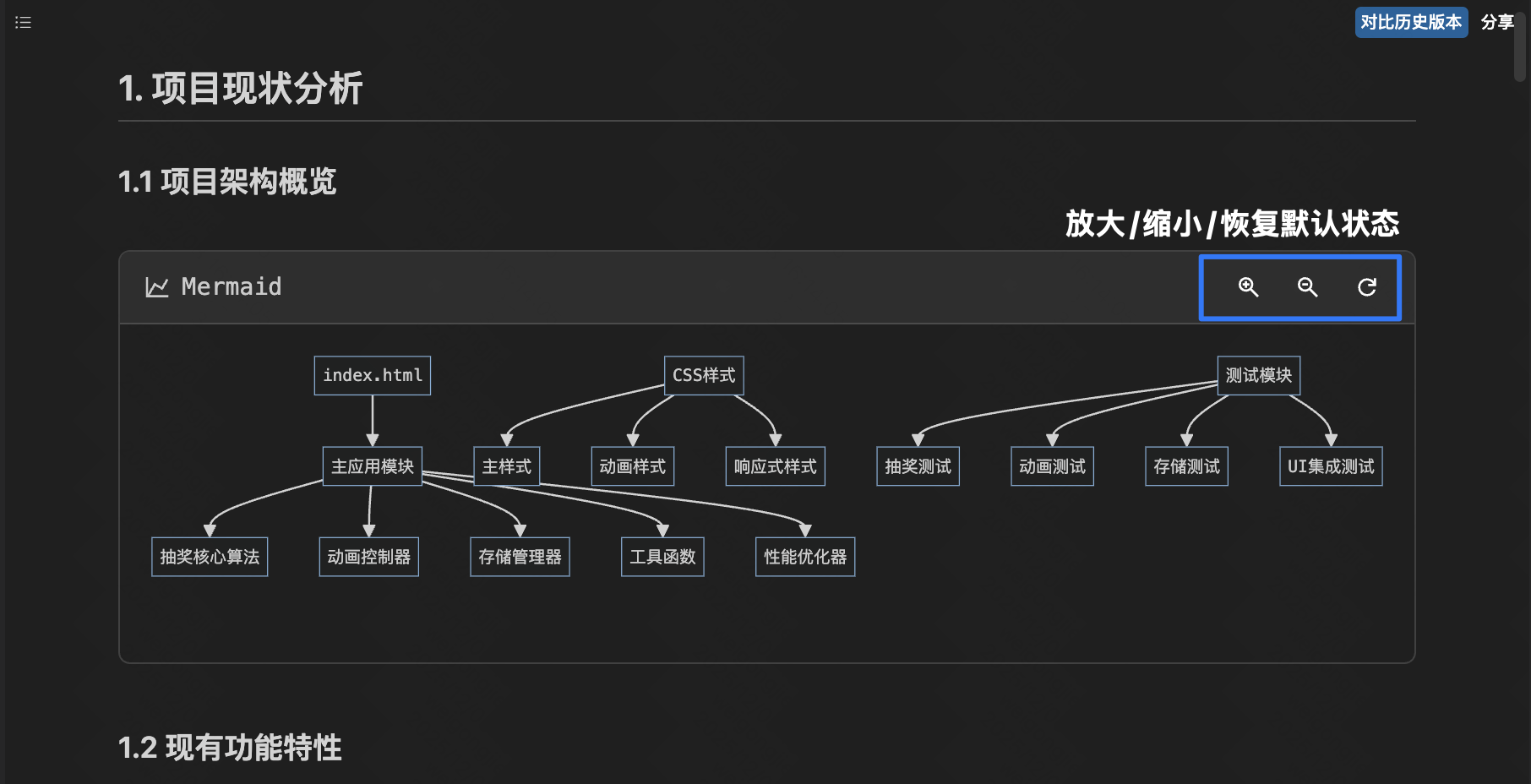
Implementation plan supports dynamic updates following conversation content, adds sharing capability, and can compare with historical versions for easy tracking of changes.
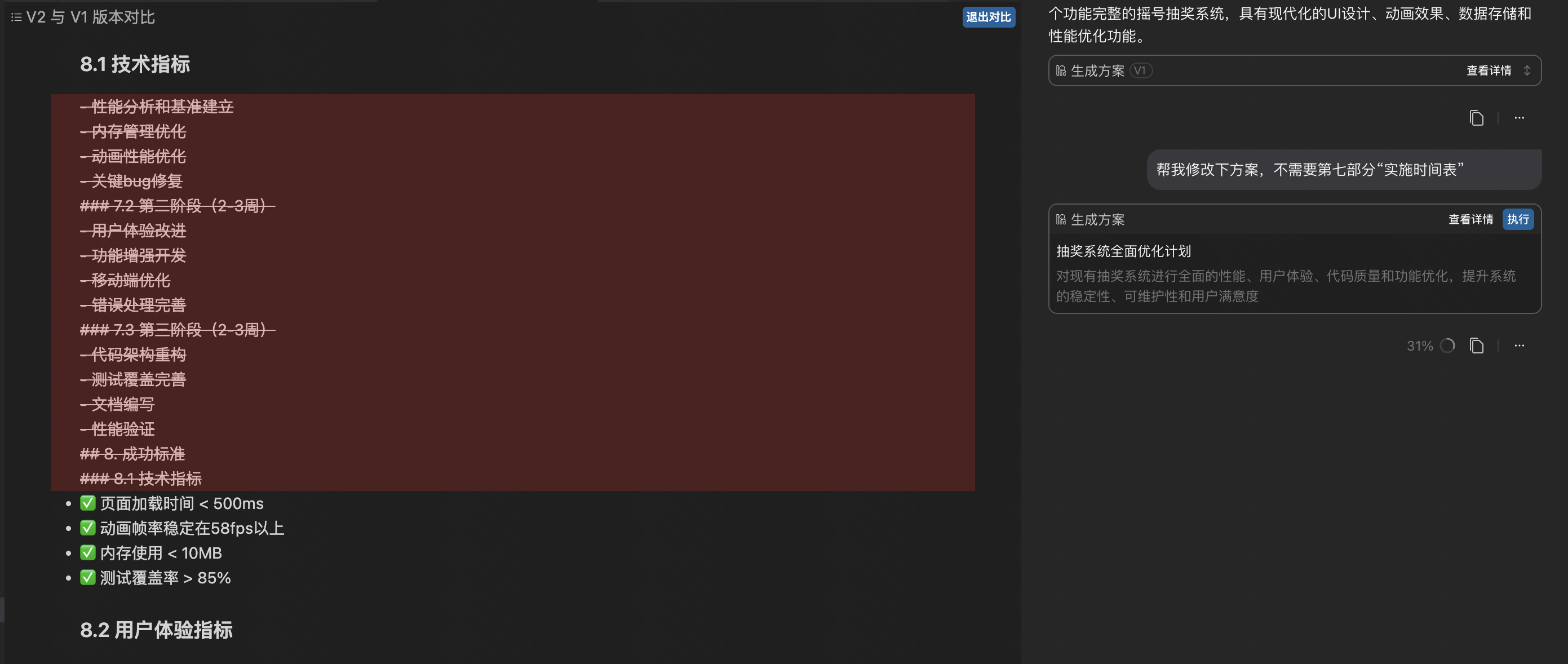
At the same time, mermaid diagrams in the implementation plan support zooming and dragging, improving reading efficiency of both overview and details.
Tools
Parallel Tool Invocation
Read-only type tools (code search, view file list, file reading) support parallel invocation, enabling synchronous execution of context collection phase, achieving 10%-20% improvement in task processing speed.
Tasks (To-dos)
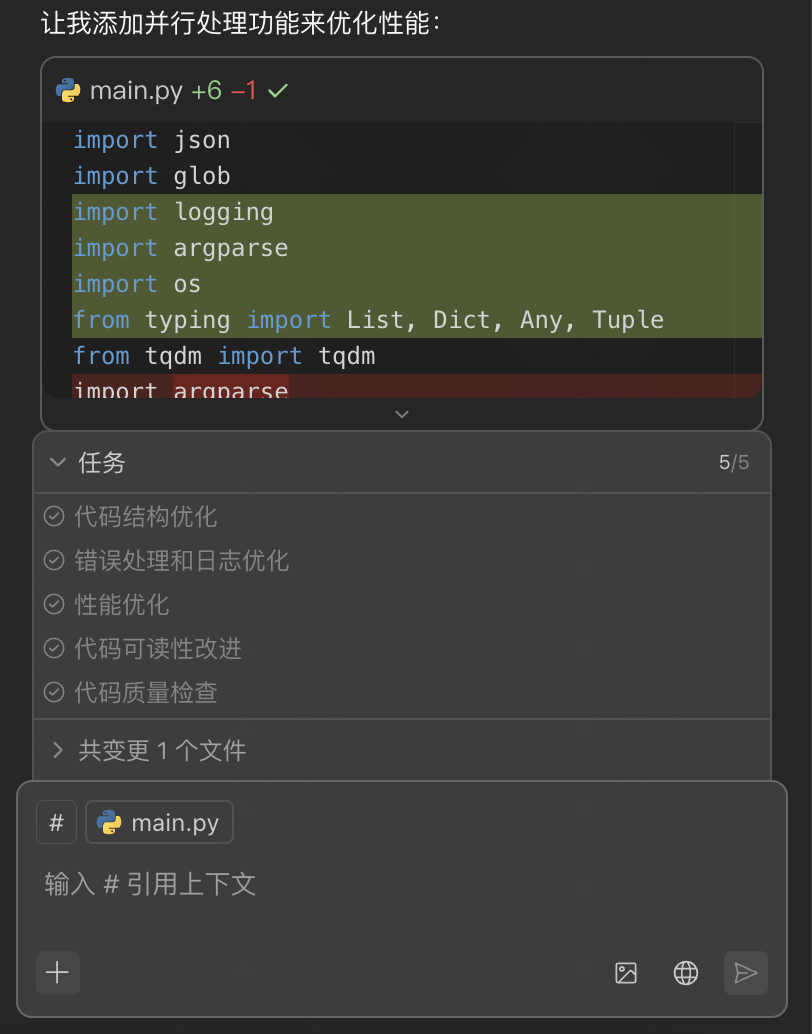
Added permanent task area, can monitor task execution progress in conversations in real time. Also optimized task presentation in conversations, adjusted from full task list to only display specific tasks in current execution state, improving task tracking efficiency.
Auto Fix
Optimized Auto Fix trigger timing and strategy, triggers checks on-demand during generation, avoiding accumulation of numerous issues difficult to fix at once due to waiting for complete file editing. Introduced editor built-in fix prompt context during fixing, and supports splitting into multiple fix subtasks, making fix suggestions more precise.
Browser
Provides Chrome plugin, supports calling user's local Chrome browser, automatically completing complex tasks in user's real account and tool environment, such as operating systems requiring login and restricted authorized devices.
For detailed usage guide, see: Browser Tool: Chrome Extension
Fixes & Optimizations
- Change code block adoption/rejection status compatible with IDE undo edit ⌘ Z operation (IDE only), supports undo for re-decision.
- Fixed IDE console memory leak issue, alleviated WebView white screen and crash issues.
- Optimized file editing tool call success rate; fixed terminal execution lag issue.
- Optimized MCP tool output, restored display of tool output results.
- Refactored Figma tool, solved issue of pasting Figma nodes causing overly long context and confused invocation.
- Optimized login failure prompt in multi-device login conflict scenarios, supports quick re-login guidance in conversation flow.
- Fixed index exception error caused by IDE restart.
- Fixed issue where session log upload prompted file too large causing failure.
2025/11/20
Version[0.6.2511200]
Agent Architecture Upgrade
Released Agent 2.0 technical architecture, supporting three core technical features: subagents, parallel execution, and openness. Utilizing parallel features, similar property tools will support parallel invocation, greatly shortening agent generation response time, coming soon.
Automatic Long Context Compression
When conversation window context usage reaches 90% of the selected model's maximum context window, the agent will automatically compress historical conversation messages before the current round, removing redundancy and retaining core information, thus maintaining fast, high-quality responses when handling long-chain tasks or multi-round conversations. Currently in internal gray release stage, planned for gradual full rollout by end of November.
Research Mode
Supports autonomous decision to invoke "Question Clarification" and "Deep Research" two subagents according to task, to adapt to different question types. Enhanced deep research capability, question breakdown clearer and more independent, research conclusions more accurate and providing citation basis. Technical design documents support generating Chinese file names, and absorbing professional evaluation feedback from angel users to further improve alignment with question goals, completeness and readability of design solutions.
Browser
CodeFlicker IDE built-in browser upgraded from iFrame to WebView implementation, supports accessing any web page and controlling web page operations, achieving more diverse development/work modes.
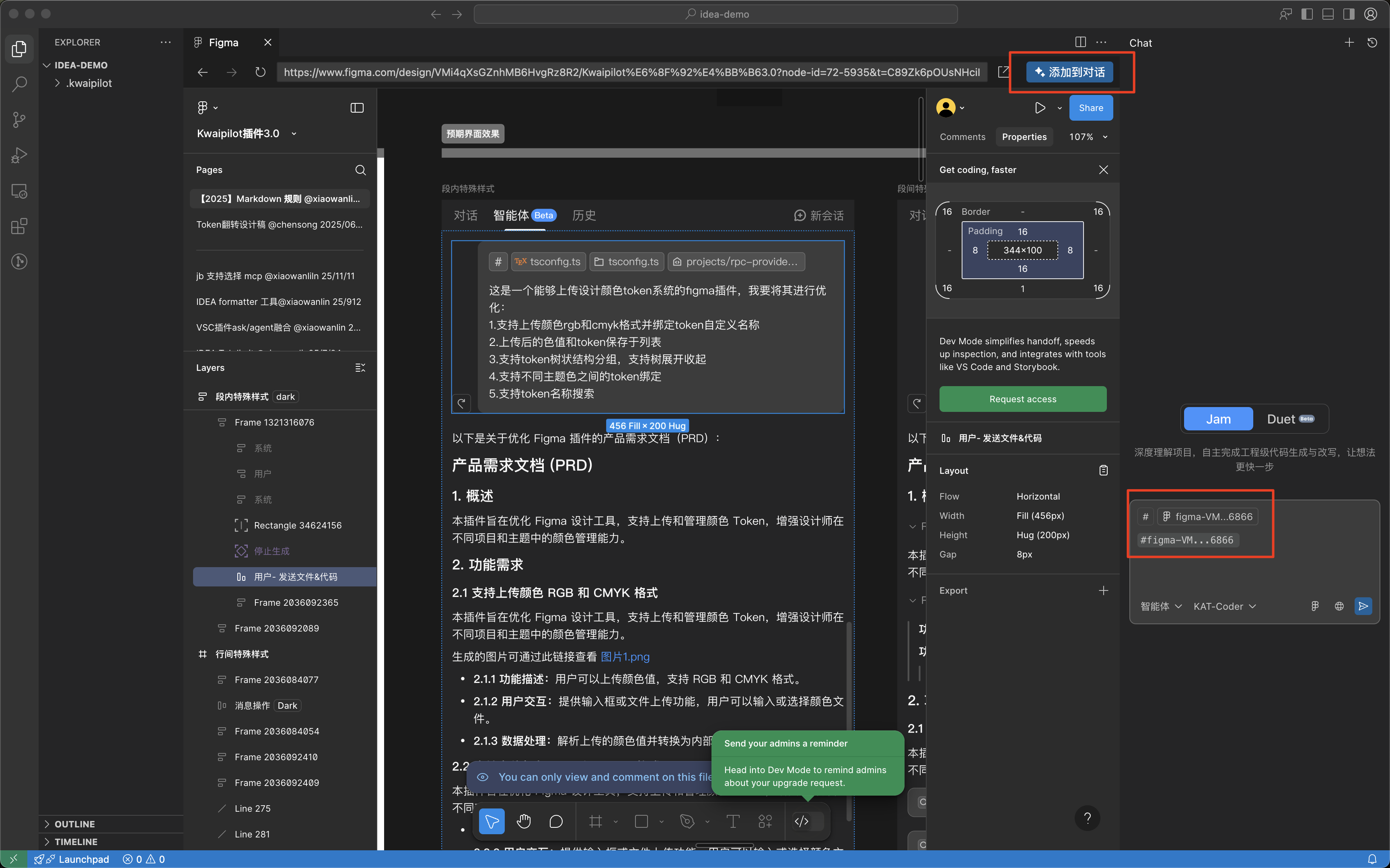
Figma in IDE
IDE built-in browser supports opening Figma pages, and added one-click select element to add to input box feature. Can click to enter from Figma icon in bottom right corner of input box.
Fixes & Optimizations
- Code block/command line output reading experience optimization: Optimized code block and command line tool display height, unified expand/collapse and scroll interaction, improved reading efficiency in conversation flow; solved previous nested double scroll issue in conversation flow and tool output.
- Fixed issue where Figma built-in tool authorization account was not previously bound to IDE user account, now supports consistent cross-device user experience.
2025/09/02 - Version[0.2.0]
Version released!
Feedback and Suggestions
We value user feedback and suggestions: If you have any ideas or encounter problems, please feel free to contact us. Feedback Page